
Name-Based Case Searches
Begin with the court type. Traffic, misdemeanor, ordinance, small-claims, landlord-tenant, and district civil matters all belong to 3B District Court. The county's public index displays columns for LAST NAME, FIRST NAME, Birth Year, CASE #, STATUS, ATTORNEY, and DETAIL. Instead of one conventional Search button, it filters by column.
Work with the most precise information you have. A distinctive surname paired with the birth-year field can narrow the district index fast. The public interface offers text filter choices. These include No Filter, Contains, Starts With, Ends With, and Equal To. One caution applies. The result list is not a certified record. The county publishes no general criminal or traffic check without a specific case number or name.
- Identify whether the matter belongs in 3B, 45th Circuit, 75th Probate, or the Family/Juvenile channel.
- Open the 3B District Court case index for a district-court matter.
- Enter a name in the appropriate column and choose a filter operator that fits the information known.
- Use Birth Year or another visible field to narrow an overbroad list, then read the status and available detail.
- Cross-check with MiCOURT or call the owning clerk if the result does not fit the known court or case type.
St. Joseph County 3B Index Columns
The county-hosted page carries the title "3-B DISTRICT COURT CASES." Its controls belong to the district-court index alone, not to the statewide MiCOURT screen. DETAIL serves as the result-link or icon column. LAST NAME, FIRST NAME, Birth Year, and CASE # work as filterable fields. STATUS and ATTORNEY simply appear in the table. Pagination controls are included. Page-size choices run 10, 20, and 50. The 3B District Court public index is the page behind this St. Joseph County docket search image.
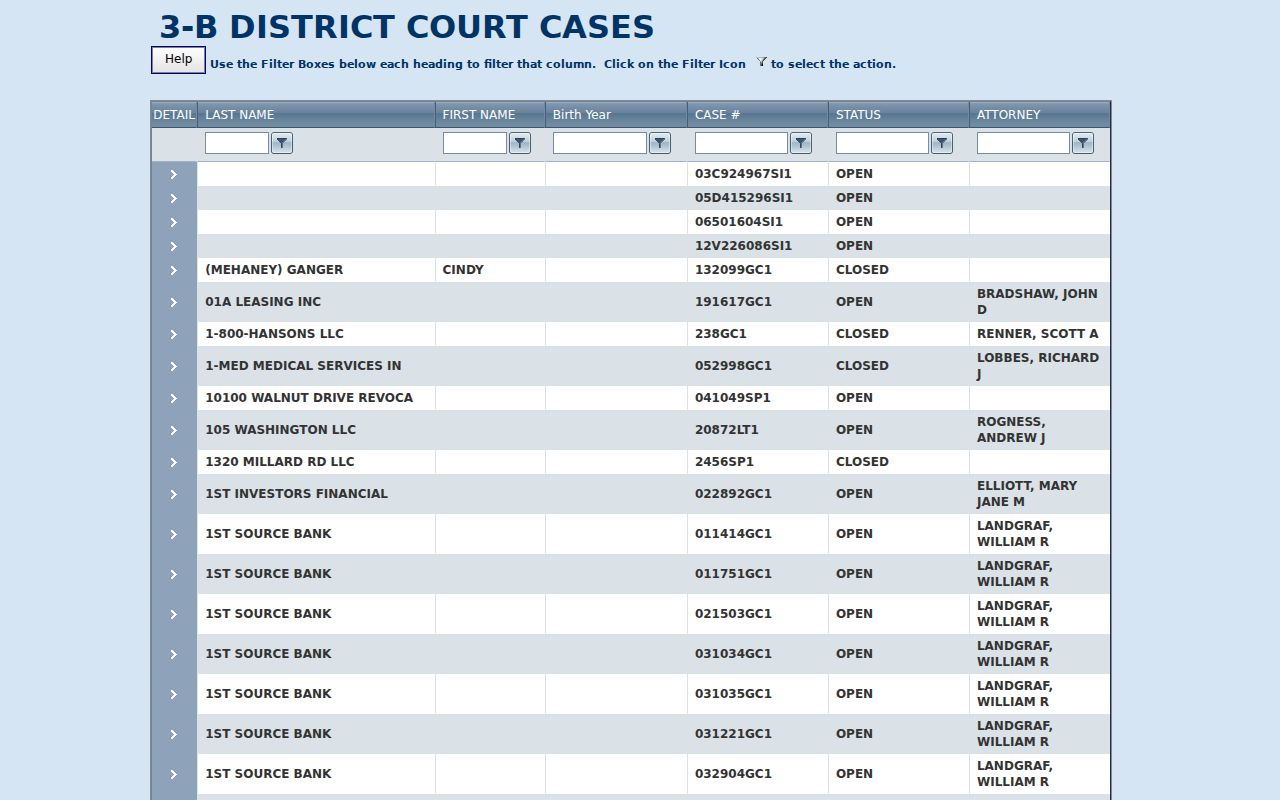
The image shows why the column filters matter more than hunting for a separate submit button. The table simply responds as you type.
| 3B field | Type | Observed use |
|---|---|---|
| LAST NAME / FIRST NAME | Text filter | Contains, Starts With, Ends With, or Equal To options were visible. |
| Birth Year | Text or numeric filter | Visible field; exact validation was not published. |
| CASE # | Text filter | Use the local identifier when it is known. |
| STATUS / ATTORNEY | Result and filter context | OPEN and CLOSED were observed; full choices were not posted. |
| Page size | Dropdown | 10, 20, or 50 records per page. |
Case Number Searches
A case number is usually the fastest St. Joseph County docket search key. The 3B index accepts CASE # as a column filter. But the county's published examples show mixed legacy patterns rather than one statewide format, including 03C924967SI1, 05D415296SI1, 12V226086SI1, 041049SP1, and 20872LT1.
Treat those samples as format clues only. They give no complete county code legend and establish no outcome. A prefix may seem to reflect a local court or case convention. The county publishes no full official key. Enter the whole number exactly as it appears on the citation, notice, order, or earlier register of actions. If the filter returns no match, contact the clerk.
St. Joseph County Filter Choices
Contains is the broadest practical choice when you know only part of a name. Starts With and Ends With narrow the pattern from one side. Equal To fits a complete, exact value. The 3B public index exposes these controls through each column's filter menu rather than through a single traditional search form.
Go narrow first when a complete case number is in hand. For names, try a focused filter before widening it. The index keeps a live, changing item count. Treat its total as no fixed county statistic. The index page posts no export option, no login, no payment screen. There is no per-document image fee.
Case Search Results Explained
A St. Joseph County case-search result is only an index layer. The 3B table can show the identifier, party-name fields, birth year, status, and attorney. It can also show any available detail. The calendar lists event, action, scheduled date, time, judge, and attorney separately. A full register of actions, or case history, may add chronological filings and court actions. A condensed result row never displays these.
| Case number | The local court identifier used to connect an index result to the owning court file. |
|---|---|
| Name fields | LAST NAME and FIRST NAME fields in the 3B index; do not treat a name alone as final confirmation. |
| Status | OPEN or CLOSED orientation information, not a certified disposition. |
| Attorney | A public table field; exact filtering behavior was not published. |
| Calendar history | Separate schedule data can show event labels, actions, dates, times, judge, and case number. |
An online return does not prove that filed document images are free, or even available. For a judgment, order, transcript, or clerk-authenticated copy, use the record-request route in the St. Joseph County court case records section.
MiCOURT Name Search Fields
MiCOURT Case Search is the statewide supplement. The live JavaScript page presented an access barrier to automated inspection, so the official Judicial Branch use-case report and API reference supply the documented field context. The official human-search example shows a court selector, Last Name or Business, First Name, Middle Name, Birth Year, and a Search control. The case-number panel shows Year, Number, Type, and Search, with Show and Clear in results filtering.
The MiCOURT public case-search interface is shown in this St. Joseph County docket search image.
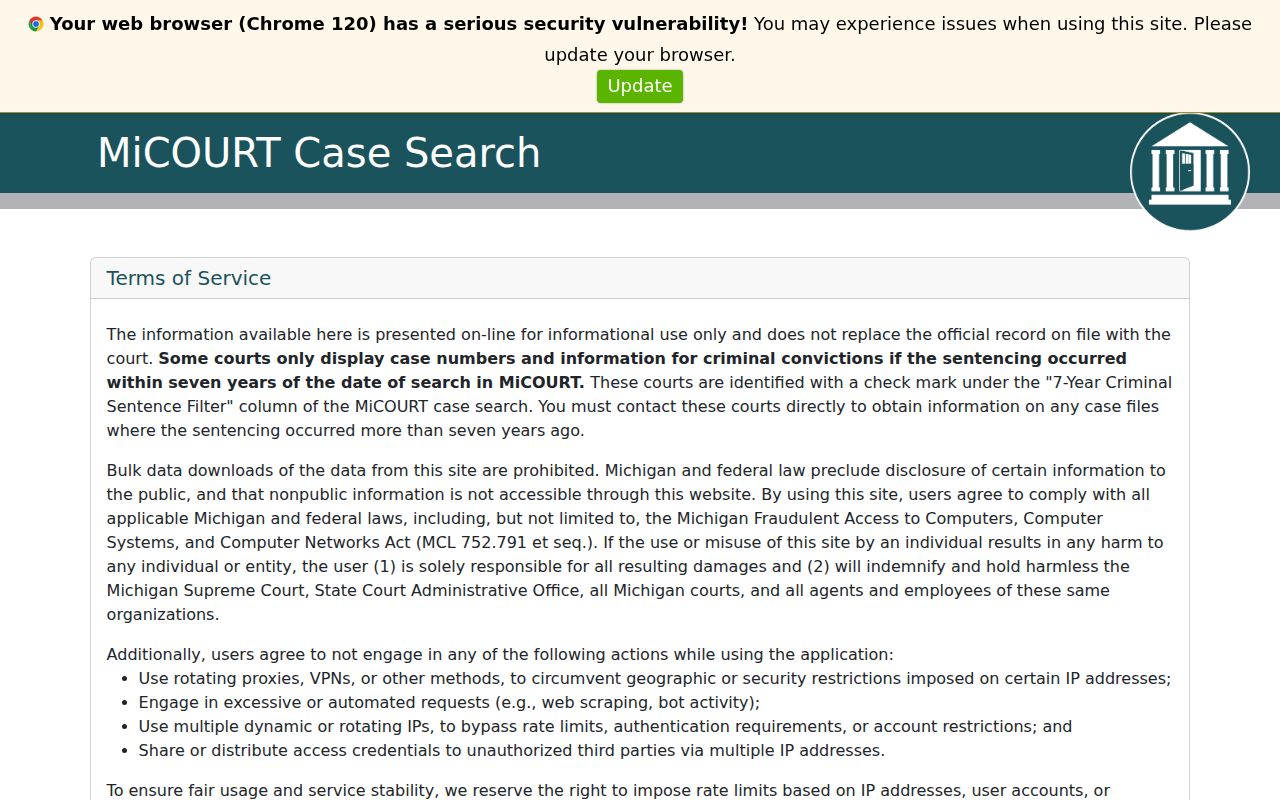
The statewide view makes court selection part of the search itself. That differs from the district-only scope of the 3B index.
Two Ways to Search: County and State
Match the channel to the court and the question. The 3B index is the concrete county-hosted source for district cases, while MiCOURT adds a statewide layer bound by participation and category limits. Neither one replaces the official court record. A Circuit, probate, family, or juvenile case may still need a direct clerk route even after an online search.
| MiCOURT statewide layer | 3B County index |
|---|---|
| Searches participating courts through a selected-court scope. | Covers the county’s 3B District Court cases. |
| Uses name or case-number panels in the official use-case example. | Uses visible table columns and per-column filters. |
| Has exclusions and a seven-year criminal sentence filter notice. | Shows a local index and status, not confirmed public document downloads. |
| Best as a cross-check across court participation. | Best for a known St. Joseph County district-court matter. |
St. Joseph County Live Index
The 3B index runs as a live table. Its public interface includes pagination, page-size controls, and an item count that shifts as St. Joseph County records update. That count is large and always moving. Treat it as a live number, never a permanent figure for the county. An exact filter is the real trick. It spares you from paging through a sprawling docket result set in the court docket search.
Filtering by case number or participant name is documented by MiCOURT's official API reference. It spells out those qualifiers in full. One caveat applies. API labels are no promise that the plain public form offers every filter.
For the docket search screen itself, the state's case-search reference is the page that governs how this St. Joseph County docket search behaves.
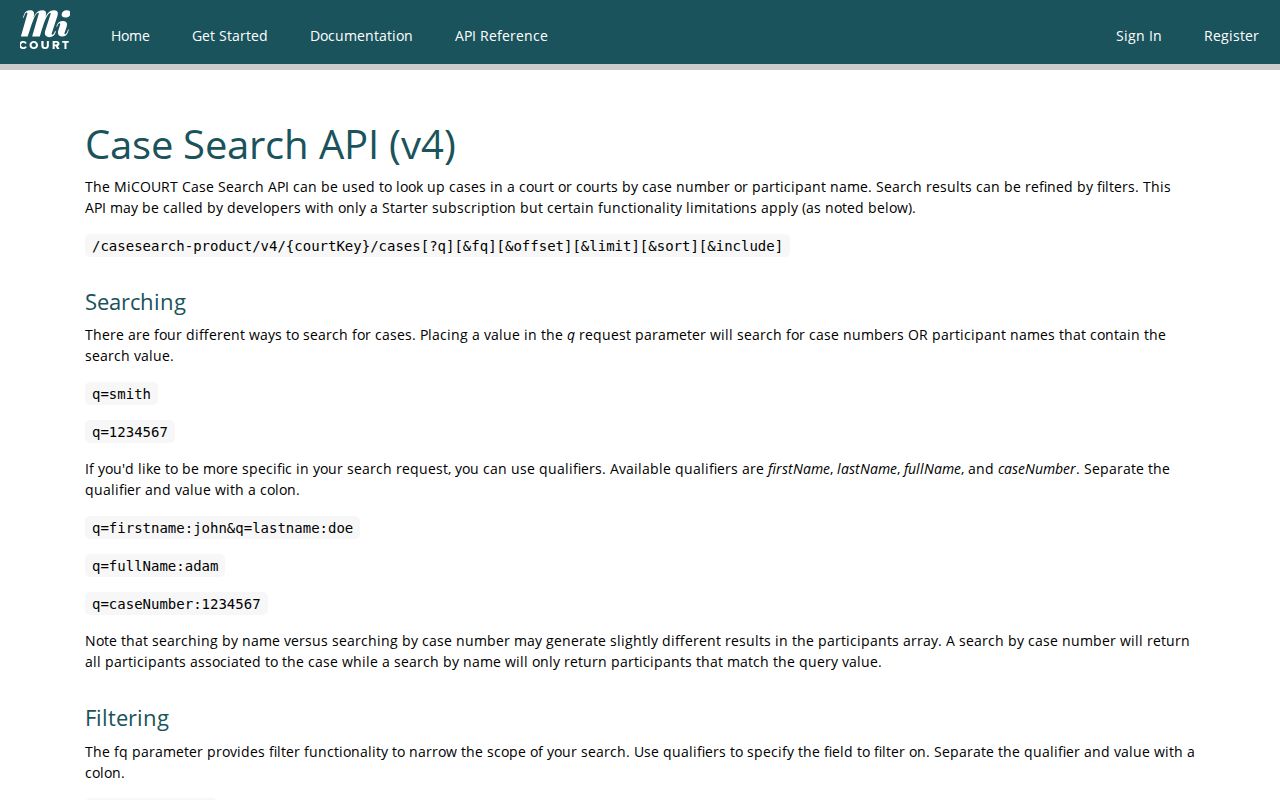
The reference helps distinguish public web controls from documented programmatic query terms.
Which Cases Stay Restricted
Michigan court records, including the register of actions and case history, are open to the public under MCR 8.119. That rule governs unless a restriction applies. Even so, a public docket search never returns every case type. MiCOURT excludes several categories from its court records results. Those include adoptions, juvenile and child-protective proceedings, juvenile guardianships, mental illness matters, name changes, PPO cases, wills, and other listed categories.
Criminal searches carry one more limit. MiCOURT applies a seven-year criminal sentence filter. It sends users to the court itself for older cases. When a St. Joseph County result comes up empty, the reasons vary: Clean Slate or set-aside law, a sealed order, a filing in the wrong court, older data, or a local format quirk. Personal identifiers stay protected under MCR 1.109(D)(9)-(10). Juvenile records follow special confidentiality rules.
St. Joseph County Missing Results
A “not found” result is not the end of the road. The case may still exist. Start by confirming the court. A St. Joseph County case could sit in 3B, the 45th Circuit, or 75th Probate. Searching the wrong one guarantees an empty result. Look again at the case-number pattern too, along with the MiCOURT court selector, category exclusions, limits on older criminal records, and restricted-record rules. One quirk is worth remembering. A 3B felony preliminary matter can spawn a separate 45th Circuit felony file later. So a single miss may just mean you looked in one drawer of two.
When the docket search keeps coming up empty, pick up the phone. The clerk who owns the file can run a specific inquiry. Give the full case number or solid party details. The County Clerk’s 45th Circuit Court Division keeps the circuit records. The 3B clerk holds the district court dockets. A free online index is a fine starting point. Still, the clerk is the court-controlled route to a public file, a copy, or a certified record.
Note: MiCOURT itself states that online information does not replace the official court record. Confirm any material result with the owning court before relying on it.